A workplace move involves more than shifting desks and boxes. Computers, servers, printers and stored information all need a clear plan that accounts for business operations. A missed item or unclear responsibility can complicate the transition, even when the move is carefully organised. The aim is to protect equipment and support an orderly return to work.
Moving sensitive office equipment requires coordination between the relocation team and the people responsible for IT. Each group has a distinct role: movers handle the physical items, while the organisation’s IT staff manage system decisions and data access. Agreeing on responsibilities and timing helps avoid confusion as equipment leaves one workspace and arrives at another.
This guide explains how professional movers assess access and prepare equipment, then pack devices and arrange transport. It also covers common relocation risks and ways to reduce disruption. After arrival, the business can work with its IT team to restore systems in a planned sequence and confirm that essential information is available to the people who need it.
Key Takeaways
- Map building access, equipment destinations and move-in restrictions before the relocation to help prevent delays.
- Use suitable anti-static protection and clear labels to keep devices, cables and accessories organised.
- Keep backups separate from systems during transport, and document equipment handovers from departure to arrival.
- After the move, test essential connections and confirm that data and key systems are accessible.
Why Protecting Sensitive Office Equipment Matters
Office technology often supports several business functions at once: finance, records, communications, customer service and daily operations. A damaged workstation can interrupt more than one employee’s tasks, while a misplaced storage device may leave essential files unavailable. Careful handling helps preserve equipment condition and reduces avoidable disruption during a move.
Business information travels with its devices. Computers, servers and external drives may contain confidential files, while printers and copiers can retain stored information. If equipment is left unsecured or handled without clear accountability, sensitive material could be exposed to people who do not need access. Including data protection in the relocation plan helps maintain control over both devices and the information they contain.
Preparation matters before equipment is disconnected. A tested backup gives the business a recovery point if a device is damaged or data becomes inaccessible. Sensitive files should be encrypted before transit, and equipment being retired should have its data properly wiped before disposal or reuse. For compliant commercial waste removal and office clearances, providers such as greenlineenvironmental.co.uk can help manage redundant workplace items responsibly. These steps address risks that protective wrapping alone cannot prevent.
There is also a practical benefit: knowing what is moving, where it belongs and who is responsible makes it easier to identify missing items and restore work in the right order. For example, a team can prioritise access to a server or key workstation before reconnecting less critical equipment. Protecting devices and data together supports a more orderly return to business.
How Professional Movers Assess Building Access and Prepare Equipment
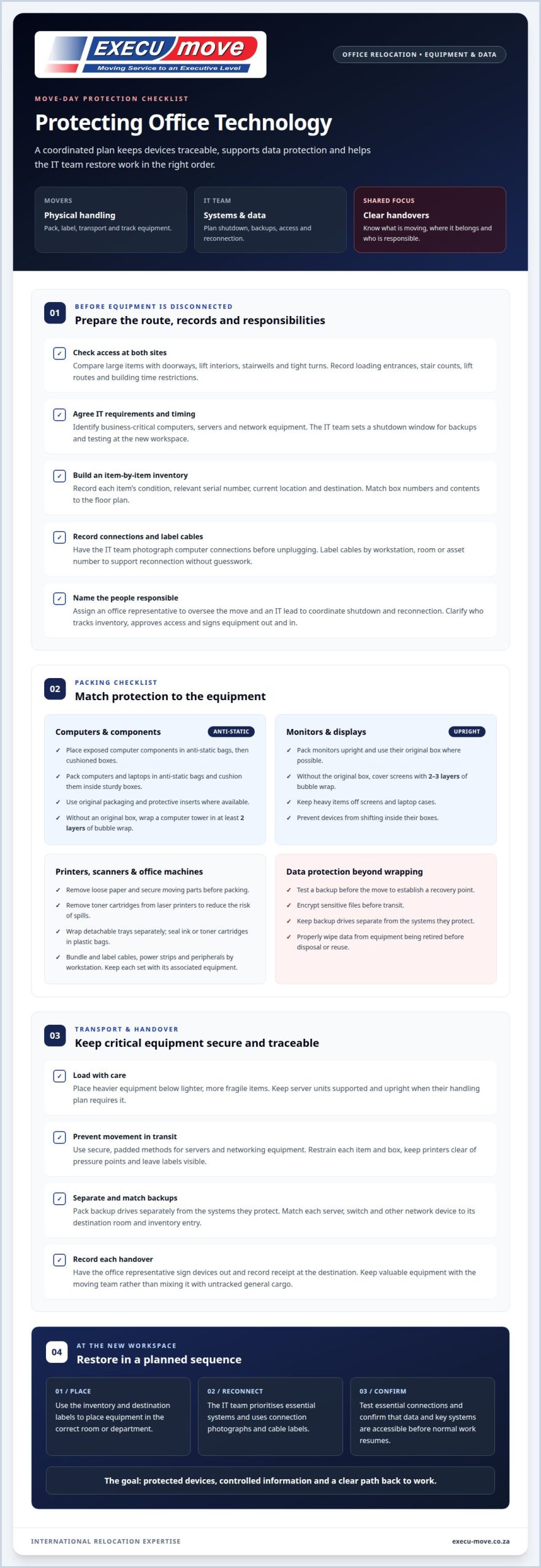
- Measure access at both sites. Movers compare large items with doorways, lift interiors, stairwells and tight turns. When moving sensitive office equipment, they record loading entrances, stair counts, lift routes and building time restrictions. This route assessment helps prevent access problems during handling.
- Assess IT requirements and timing. The IT team identifies business-critical computers, servers and network equipment before disconnection. It sets a shutdown window for backups and testing at the new workspace. Coordinating these tasks helps limit downtime and disruption.
- Create a detailed inventory. Movers record each item’s condition, relevant serial number, current location and destination. For moving sensitive office equipment, this inventory connects each device to its new room or department. Box numbers and contents can also be matched to the floor plan.
- Document connections and label cables. The IT team photographs computer connections before unplugging them. Movers label cables by workstation, room or asset number. These records help the IT team reconnect equipment without guesswork.
- Assign roles and oversee handovers. Name an office representative to oversee the move and an IT lead to coordinate shutdown and reconnection. Staff should know who tracks inventory, approves access and signs equipment out or in at each handover.
How Professionals Pack Sensitive Devices with Anti-Static Materials
Professional packing combines anti-static protection, cushioning and clear identification. Each type of device needs appropriate handling.
Applying anti-static packing materials to protect sensitive devices
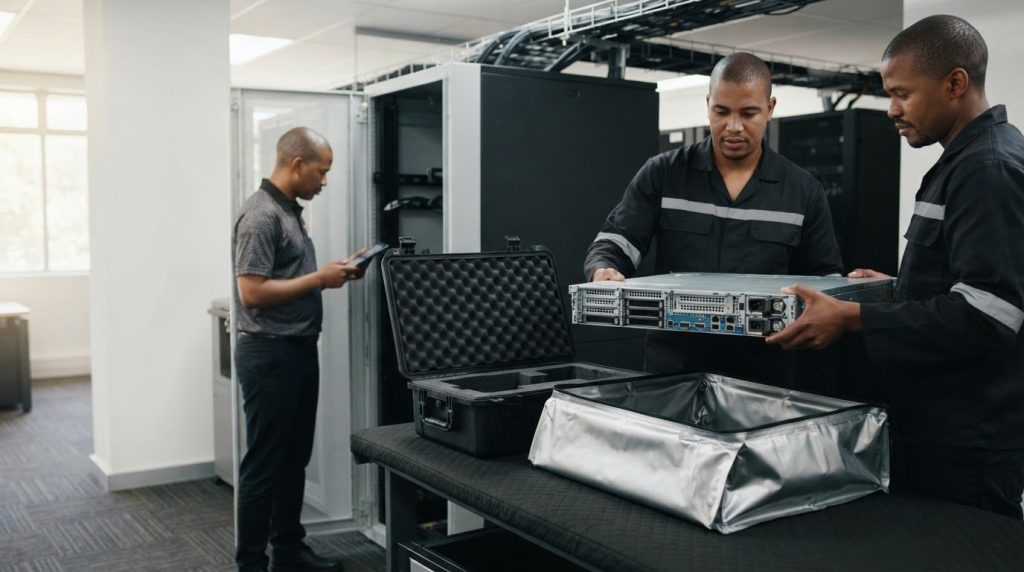
Use anti-static bags for exposed computer components, then place them in cushioned boxes. These bags help reduce the risk of static discharge affecting sensitive electronics. The packing team should keep ordinary wrapping away from exposed components and prevent devices from shifting inside their boxes. Clearly label each package with its contents and destination, without drawing unnecessary attention to critical equipment.
How professionals pack computers, laptops and displays
Pack computers and laptops in anti-static bags, then cushion them inside sturdy boxes. Original packaging can provide a close fit and protective inserts. If a computer tower has no original box, use at least 2 layers of bubble wrap. Pack monitors upright; without their original boxes, cover screens with 2-3 layers of bubble wrap. Keep heavy items off screens and laptop cases.
How professionals pack printers, scanners and office machines
Remove loose paper and secure moving parts before packing printers, scanners and multifunction machines. Remove toner cartridges from laser printers to reduce the risk of spills. Wrap detachable trays separately, and seal ink or toner cartridges in plastic bags. Bundle power strips, cables and peripherals securely, label them by workstation, and keep each set with its associated equipment.
How Professionals Arrange Secure Transport for Servers and Networking Equipment
A transport plan keeps servers, network hardware and their backups separate and traceable. Careful loading helps minimise movement and supports a smoother setup at the new office.
-
How professional movers load and secure equipment for transport
Place heavier equipment below lighter, more fragile items, keeping server units supported and upright when their handling plan requires it. Movers use secure, padded methods for servers and networking equipment, then restrain each item and box to prevent shifting in transit. Keep printers and other office equipment clear of pressure points, and ensure labels remain visible for accurate placement on arrival.
-
How professionals transport sensitive equipment
Separate backup drives from the systems they protect, using distinct, clearly identified boxes. This reduces the chance that one incident affects both the primary equipment and its recovery copy. Movers match each server, switch or other network device to its destination room and inventory entry. At handover, the office representative signs devices out and records receipt at the destination. Keep valuable equipment with the moving team, rather than mixing it with untracked general cargo. The IT lead can then prioritise reconnection and test access before normal work resumes.
Before disconnecting devices, businesses should securely back up important data to the cloud or an external storage device. Every item of IT equipment being moved, from desktop computers to servers, needs a handling plan tailored to it.
What Risks Can Damage Sensitive Office Equipment During Relocation?
- Check each route before moving equipment. Measure doorways, lifts and stair turns at both sites. A server cabinet that cannot clear a corner may be struck, tilted or delayed during handling.
- Use anti-static protection for exposed computer components. Static discharge can damage sensitive electronics even when the casing looks intact. Keep screens upright, cushion devices, and avoid placing heavy boxes on monitors or printer trays.
- Secure every item inside the vehicle before departure. Unrestrained boxes can shift during transport, damaging equipment or disrupting labelled loads. Keep heavier items below lighter devices, and ensure servers and network equipment have padded support.
- Allow electronics to acclimate for 30-60 minutes after moving from a hot or cold truck before powering them on. This step helps avoid switching on equipment immediately after a temperature change.
- Protect data as well as hardware. Back up essential files before disconnection, keep backup media separate from systems, and record who receives each device. For example, match a server’s handover to its inventory entry.
- Prepare the destination before reconnection. Confirm that the new workspace has working electricity and broadband, then have IT test network access, printers and key workstations. This helps identify connection problems before staff resume normal tasks.
Execu-Move: Office and Corporate Relocations
Execu-Move’s Office and Corporate Relocations help businesses plan the physical move of workplace contents, including office furniture and packed equipment. For sensitive devices, the relocation plan should align the move schedule with the company’s IT preparation, so equipment arrives where it is needed and staff understand their responsibilities.
Before moving day, the business can provide an inventory, destination details and access requirements. Its IT team should manage data backups, device shutdowns and reconnection, while the moving plan covers equipment handling and placement. Clear roles help keep sensitive systems separate from general office contents and make handovers easier to track.
Full Packing and Wrapping can support the preparation of office contents for relocation. The packing plan should identify which devices need careful handling, how boxes are labelled and where each item belongs. This is especially useful when computers, displays and peripherals need to return to specific workstations rather than being placed together in a general delivery area.
Whether the move is within South Africa or international, the right relocation service depends on the journey and the wider office move. Execu-Move also provides domestic and international furniture removals as part of its relocation services. Involve the IT lead early, particularly when servers, network equipment or confidential records affect the move sequence.
For a planned workplace move, contact Execu-Move to discuss the relocation.
Frequently Asked Questions
How do professional movers pack sensitive office equipment, and what should clients prepare?
Professional movers plan packing around the equipment and the move sequence. Clients should identify devices that must remain in use until the agreed shutdown, such as a reception workstation or a system needed for end-of-day processing. The IT lead can explain when each item is ready for handling. This helps coordinate packing with business operations without interrupting work earlier than planned.
What packing materials do professionals use to protect computers, servers and printers during transport?
Material choices depend on a device’s shape, weight and vulnerable parts. For instance, handle a printer with detachable trays separately from its main body, while a server requires support suited to its size and form. The packing team should follow manufacturer instructions where available and avoid putting pressure on delicate components. No single combination of materials suits every device.
How do professional movers safely disconnect and label office equipment and cables before moving?
The IT team should control system shutdowns and confirm when equipment is ready for physical handling. This matters for network devices that support several departments: switching off the wrong unit too early could interrupt active work. Movers can then handle released equipment according to the agreed move plan. The IT lead remains responsible for technical decisions, while the move coordinator manages timing and placement.
How do professional movers transport servers and other fragile IT equipment safely?
Safe transport includes recording the equipment’s condition at collection and checking it again at delivery. For example, the receiving representative can compare a server’s visible condition with its departure record before it enters the installation area. Any difference can then be reported while handover details are clear. Keep the IT lead informed about arrival timing so reconnection can follow the organisation’s operational priorities.
Should office equipment be moved by a specialist IT relocation company?
A separate IT relocation specialist may be appropriate when a move includes complex system configuration, data-centre infrastructure or technical installation. A furniture removal team can manage the physical relocation, while the organisation’s IT staff oversee system requirements. The right approach depends on the work involved: assign technical decommissioning or configuration to the team responsible for the systems.
How do professional movers protect equipment from extreme heat, humidity or dust during a move?
Plan loading and delivery to limit the time equipment is exposed to outdoor conditions. Keep devices protected until their destination area is ready, and choose a clean, dry location away from dust-producing work. At the new office, allow space around equipment for ventilation and access. If devices have travelled in a hot or cold vehicle, let them acclimatise before powering them on.
For support planning an office relocation, contact Execu-Move.